How to Check Your Mobile Number from SIM: Jazz, Zong, Ufone & Telenor Codes (2026)
Got a new SIM, or forgot your own number? Here’s how to check mobile number from SIM in seconds by dialing a short code — no internet or app needed. Below are the codes for every Pakistani network, plus backup methods if a code doesn’t work.
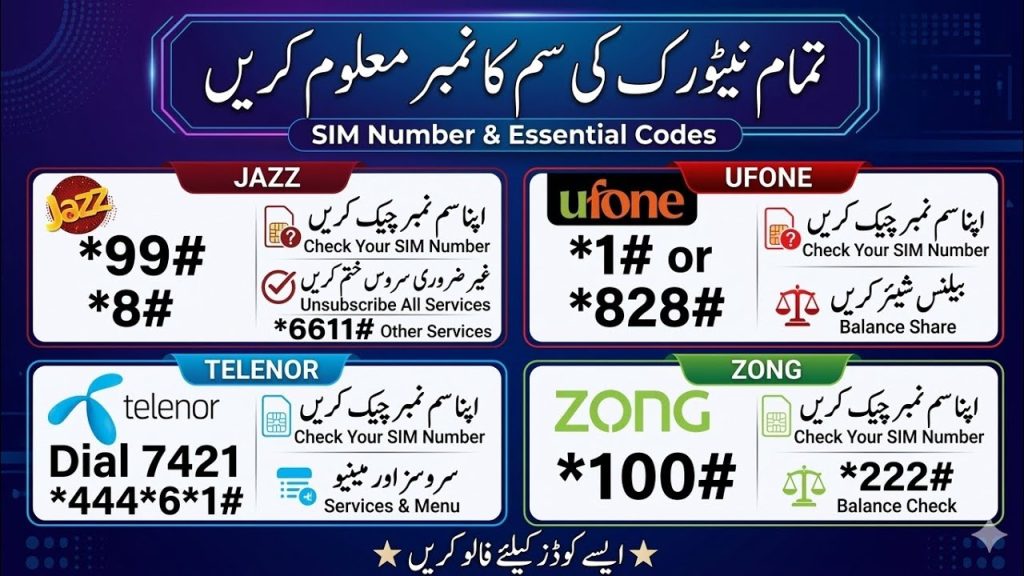
Quick answer: Dial *99# on Jazz, *8# on Zong, *780*3# on Ufone, or *8888# on Telenor. Your number appears on screen or arrives by SMS.
SIM Number Check Codes (2026)
| Network | Code to dial | Helpline |
|---|---|---|
| Jazz (incl. ex-Warid) | *99# | 111 |
| Zong | *8# | 310 |
| Ufone | *780*3# | 333 |
| Telenor | *8888# | 345 |
Operators change their codes from time to time. If a code doesn’t work, use one of the backup methods below, call the helpline, or check the operator’s official website: Jazz, Zong, Ufone, Telenor.
How to Check Mobile Number from SIM — Step by Step
- Insert the SIM and wait until it shows network signal.
- Open the phone dialer.
- Dial the code for your network from the table above and press call.
- Your number appears in a pop-up message or arrives as an SMS.
On dual-SIM phones, make sure you dial from the SIM you want to check — the phone may ask which SIM to use.
Jazz
Dial *99#. The number appears on screen, usually free of charge. This works for former Warid SIMs too, since Warid is now part of Jazz.
Zong
Dial *8#. Zong shows your number in a pop-up message.
Ufone
Dial *780*3#. Your Ufone number is shown on screen.
Telenor
Dial *8888#. Your Telenor number is displayed or sent by SMS.
Code Not Working? 4 Backup Methods
- Call or text someone you know. Your number will appear on their screen.
- Check your phone settings. On Android go to Settings → About phone → Status → SIM status; on iPhone go to Settings → Phone → My Number. Some SIMs don’t store the number, so this may be blank.
- Use the operator’s app (My Jazz / Jazz World, My Zong, My Ufone, My Telenor). After you log in with an OTP, the app shows your number.
- Call the helpline (Jazz 111, Zong 310, Ufone 333, Telenor 345) and ask an agent.
Why You Should Know Your SIM Number
Your number is needed far more often than people expect: for bank and mobile wallet sign-ups, receiving OTP codes, recharging your balance, buying packages for a family member, and giving it to couriers or employers. If you have more than one SIM, it’s easy to mix them up. Knowing how to check mobile number from SIM saves you from guessing and from sending codes to the wrong number.

Save Your Number So You Don’t Forget It
- Save it as a contact named “My Number”.
- Write it on the SIM card holder or packaging.
- Keep a note of every SIM you own, so you can spot a number that isn’t yours when you check the SIMs on your CNIC.
Checking Your Number vs Checking a SIM’s Owner
These codes show your own number only. They don’t tell you whose CNIC the SIM is registered on. To confirm that a SIM is registered in your name, see our guide on how to check my SIM owner.
Frequently Asked Questions
How do I check mobile number from SIM?
Dial the code for your network: Jazz *99#, Zong *8#, Ufone *780*3#, Telenor *8888#.
Are SIM number check codes free?
Usually yes. They work even with zero balance on most networks.
Why does the code show an error?
The SIM may have no signal, may be blocked or inactive, or the operator may have changed the code. Try a backup method or call the helpline.
Can I check another person’s number with these codes?
No. The codes only show the number of the SIM in the phone you are using.