How to Check My SIM Owner Name and Mobile Number Details (2026)
Bought a SIM from a shop, got one from a family member, or using an old SIM you found at home? Then you’re probably asking, “How do I check my SIM owner?” — in other words, whose CNIC the SIM is registered on. It matters, because the registered owner is legally responsible for that number. This guide explains how to check your SIM owner, what mobile number details you can find, and what to do if the SIM isn’t in your name.
Quick answer: To check who your SIM is registered to, call your network’s helpline from that SIM (Jazz 111, Zong 310, Ufone 333, Telenor 345) or visit its franchise with your CNIC. To confirm a SIM is in your name, send your CNIC to 668 and make sure the count matches the SIMs you use.
Why You Should Check Your SIM Owner
- Legal responsibility: If a SIM registered on someone else’s CNIC is misused, problems land on that person — and if a SIM on your CNIC is misused, they land on you.
- Account recovery: Only the registered owner can easily get a duplicate SIM, recover the number, or port it to another network.
- Mobile wallets: JazzCash, Easypaisa and bank OTPs are tied to the registered owner.
How to Check My SIM Owner — 4 Ways
1. Call the helpline
Call from the SIM you want to check: Jazz 111, Zong 310, Ufone 333, Telenor 345. Ask the agent whether the SIM is registered on your CNIC. For privacy, they may only confirm whether it matches the CNIC you give them.
2. Use the operator’s app
Log in to My Jazz / Jazz World, My Zong, My Ufone or My Telenor with the SIM. On some networks, the account or profile section shows the registered name for that number.
3. Check your CNIC with 668
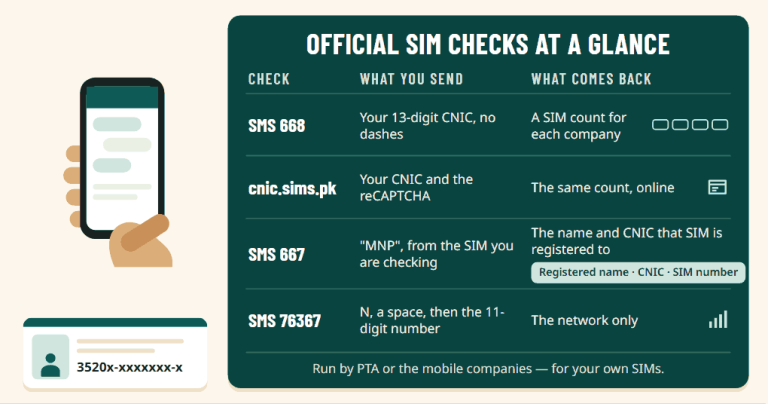
Send your 13-digit CNIC to 668, or enter it at PTA’s cnic.sims.pk. If the number of SIMs on that network includes the SIM you’re using, it is likely registered to you. For a certain answer, combine this with method 1 or 4. Full steps: which SIM numbers are on my CNIC.
4. Visit a franchise
Take the SIM and your original CNIC to the operator’s franchise. After fingerprint verification they can confirm whose CNIC the SIM is on — and transfer it to your name if needed.
You may also see claims online that a single code (for example sending “MNP” to 667) reveals the registered owner. Results from these vary by network and over time, so treat them as a hint, not proof, and confirm through one of the methods above.
What Mobile Number Details Can You Check?
For any mobile number, here is what is realistically available:
| Detail | How to check |
|---|---|
| Your own number | Dial *99# (Jazz), *8# (Zong), *780*3# (Ufone), *8888# (Telenor) |
| SIMs on your CNIC | 668 or cnic.sims.pk |
| Owner of a SIM you hold | Helpline, operator app, or franchise |
| A number’s original network | Its first four digits (it may have moved via MNP) |
| Whether an unknown caller is spam | Search the number online or use a caller ID app |
Personal details of other people — such as their CNIC, address, call history or live location — are protected by law. If someone is harassing or defrauding you, report the number to PTA or NCCIA (1799) and let them identify the owner. Read more: SIM information check by mobile number.
SIM Not in Your Name? Here’s What to Do
- Go to the operator’s franchise with the current owner (if you know them) and both original CNICs.
- Ask for an ownership transfer. Both people complete biometric verification.
- If you don’t know the owner, ask the franchise about your options — you may need to get a new SIM in your own name.
- Stop using the SIM for banking or mobile wallet accounts until it’s in your name.
Frequently Asked Questions
How can I check my SIM owner name?
Call the network’s helpline from the SIM, check the operator’s app, or visit a franchise with your CNIC.
How do I check my SIM number details?
Dial your network’s number check code to see your number, and send your CNIC to 668 to see how many SIMs are registered to you.
How do I get the information of a mobile number?
You can find a number’s original network and check whether it has been reported as spam. Private details of the owner are only available to authorities through a formal complaint.
Is it safe to use a SIM registered to someone else?
No. Transfer it to your own name at a franchise, because the registered owner is responsible for how the SIM is used.